
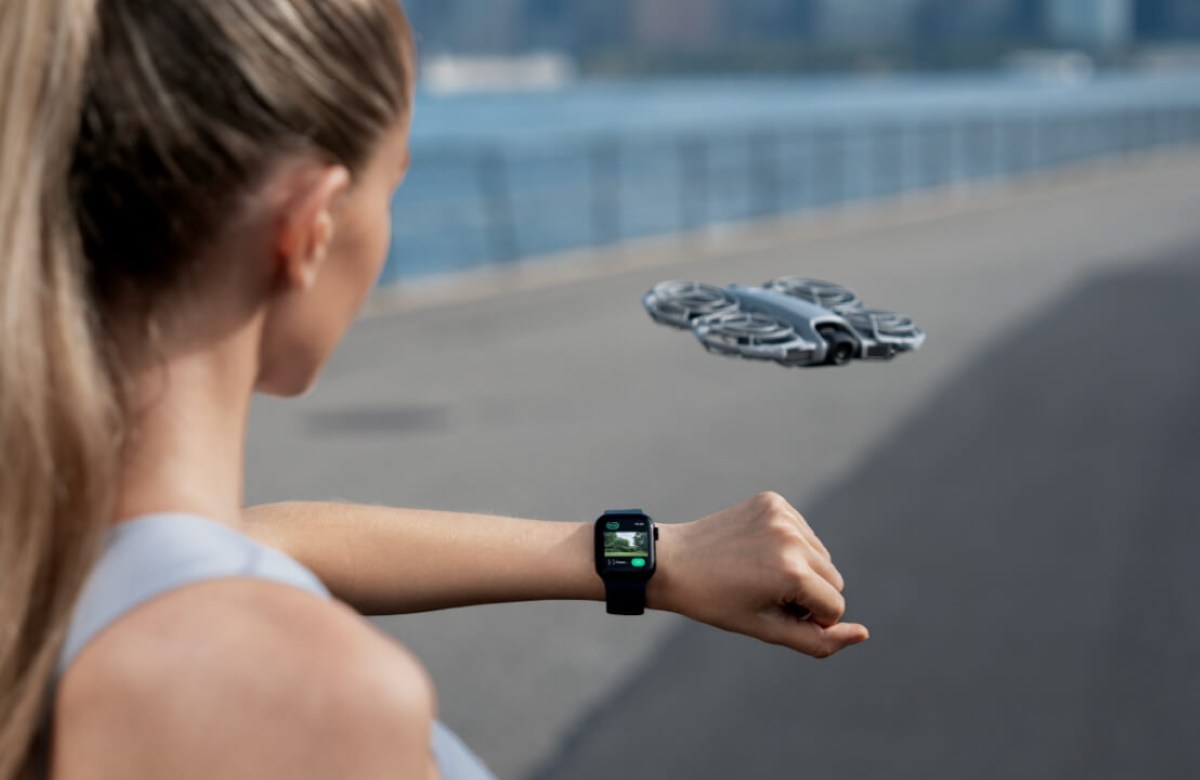
DJI has made flying a drone feel a whole lot more futuristic. With a brand-new firmware update, the DJI Neo 2 now supports Apple Watch remote control, letting you steer, track, record, and manage your drone right from your wrist. And here’s the kicker: the original DJI Neo is getting the same Apple Watch compatibility soon, making this upgrade a big win for every buyer in the Neo lineup. If you’re an Apple user who’s been flirting with the idea of buying a drone, this is the moment DJI clearly wants you to jump in.
Apple Watch becomes DJI Neo 2 drone remote
The new DJI Neo 2 firmware, v01.00.0500, unlocks something we’ve honestly never seen on a mainstream DJI drone before: full support for remote control with Watch, though this feature has previously been made available for DJI smartphone gimbals.
DJI Neo 2 now supports Apple Watch models Series 8, 9, 10, 11, Ultra 2, and Ultra 3, as long as you’re running watchOS 11 or later. And the only app you need is the freshly updated DJI Fly app v1.19.4.
DJI specifically calls out that this feature shines during sports scenarios like cycling and running — basically any moment where grabbing your phone or controller is inconvenient. Imagine bombing down a trail on your mountain bike… and your 4K/100fps video drone with omnidirectional obstacle sensing is tracking you, responding to taps and voice commands from your wrist. This is the kind of futuristic lifestyle DJI wants to unlock.
See the full list of DJI drones gaining Apple Watch remote control compatibility.
The Apple Watch app version of DJI Fly brings a surprising amount of power for such a tiny screen. But because this is a drone, there are a few things Apple users need to know…
Live camera view… with Wrist Logic: You will get a live camera view on your watch, but Apple’s power-saving rules still apply. So:
- Lower your wrist → screen goes into low-refresh mode → live view momentarily pauses.
- Raise your wrist or tap → live view resumes instantly.
Yes, you can turn off your phone screen: This is such an underrated quality-of-life feature. You can:
- Lock your iPhone
- Switch to another app
- Put it in your pocket
As long as DJI Fly is running in the background, your Apple Watch stays connected to the drone. Force-quit the app, and the link breaks, so don’t do that.
Voice control built in: If you want to trigger actions with your voice, just:
- Give microphone access to DJI Fly on your iPhone
- Turn on “Voice Control” in DJI Fly settings
Now you can issue spoken commands right from your watch.
App audio recording
Same rules as voice control:
- Give mic permission
- Enable “App Recording” in settings
Your watch becomes a mini mic for on-the-go sound capture while the drone films from above.
Keep the app awake longer
You can force your Apple Watch display to stay awake for 70 seconds: Settings → Display & Brightness → Wake Duration → Wake for 70 Seconds
Perfect when you want the live view or status info to remain visible.
The next thing to know is that DJI Fly doesn’t work when your Apple Watch is in Low Power Mode—but that’s expected. Just toggle Low Power Mode off in: Settings → Battery → Low Power Mode
Other perks in this firmware update
DJI didn’t stop with Apple Watch support. Neo 2 also gets:
- Beep notifications when:
• Tracking loses the subject
• Battery is low
This is super helpful when you’re not looking at your phone or watch.
Plus:
- Several bug fixes to improve stability.
And firmware updates have dropped across the DJI ecosystem: RC-N3, Goggles 3, Goggles N3, RC Motion 3, FPV RC 3, RC 2, RC-N2 — basically a full ecosystem refresh.
For Apple Watch users, Neo 2 suddenly feels like a drone designed just for them. And for DJI? This is a brilliant move to make Neo 2 the go-to drone for the Apple ecosystem crowd — travelers, cyclists, vloggers, hikers, and everyday iPhone users who want their first drone to be compact, simple, and smart.
New: HoverAir Aqua drone shipping delay: What backers need to know


FTC: We use income earning auto affiliate links. More.


Comments