
DJI is giving its popular Osmo Pocket 4 camera another round of refinements just as the holiday filming season approaches. The latest firmware update, v01.04.12.16, adds a more convenient tracking shortcut, improves color-conversion tools, and brings automatic media transfers to compatible devices.
The update is not a major feature overhaul. But for creators planning to capture Halloween celebrations, Thanksgiving gatherings, holiday decorations, and New Year’s Eve festivities, these smaller improvements could make the camera more convenient to use when moments unfold quickly.
What’s new in the DJI Osmo Pocket 4 update?
The most immediately useful change for creators is the addition of ActiveTrack to the Custom Button’s single-press and double-press functions. Users can assign tracking to either action, making it easier to access while filming.
That could come in handy when recording family gatherings, walking through a crowded holiday market, or filming yourself in front of elaborate seasonal decorations. Rather than navigating menus when you want the camera to follow a subject, you can assign tracking to a button press.
The update also introduces Auto Media Transfer support for HarmonyOS devices. Newly captured photos and videos can automatically transfer to the mobile device’s album after the camera powers off, while photos can also transfer instantly.
For creators who spend time editing footage, DJI has also updated its D-Log-to-Rec.709 and D-Log-to-Rec.709 Vivid LUT files to version 2.0. These tools convert flat-looking D-Log footage into more conventional color profiles, with the revised versions intended to improve color-reproduction accuracy and consistency.
The remaining changes include interface and image-quality optimizations in certain scenarios, along with fixes for unspecified known issues.
The firmware update is only part of the appeal. The Osmo Pocket 4 packs a 1-inch CMOS sensor, three-axis mechanical stabilization, 10-bit D-Log, and up to 14 stops of dynamic range into a compact camera designed to travel easily.
It can record 4K video at up to 240 frames per second in slow-motion mode, making it possible to stretch out moments such as confetti falling, decorations being unveiled, or friends celebrating together. Its ActiveTrack 7.0 system can follow subjects at up to 4x zoom, while the rotatable touchscreen makes switching between horizontal and vertical recording straightforward. There is also 107GB of built-in storage, reducing the need to carry a memory card for everyday shooting.
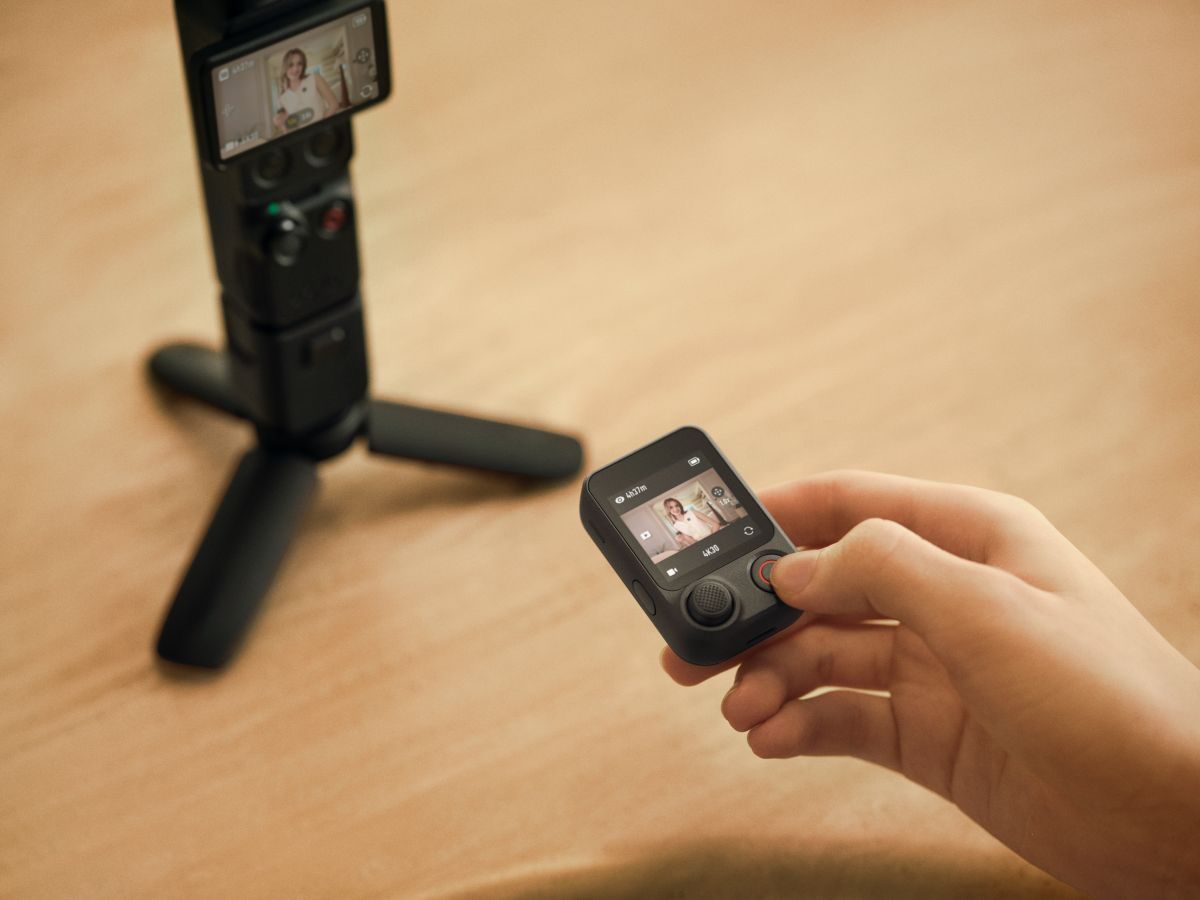
The Osmo Pocket 4’s camera specs are impressive, but one accessory could make an even bigger difference for creators who travel or film on their own: the FrameTap remote controller. The touchscreen remote lets you see the camera’s live view from a distance, adjust the gimbal’s direction, change composition, and control key shooting functions without standing beside the camera. You can also tap a subject on the remote’s screen to activate ActiveTrack, helping keep that person centered in the shot.
That opens up some fun possibilities for the festive season. Want a family portrait with everyone in the frame, including the person usually stuck taking the picture? Planning a holiday-market walk-through, a decorated-home tour, or a New Year’s Eve video where you appear on camera, too? FrameTap makes those shots easier to set up without repeatedly walking back to check your framing.
All in all, the Pocket 4 is an interesting alternative for people who want more deliberate, stabilized footage than they typically get from handheld smartphone video, without carrying a larger camera setup. And timing matters. The festive season is full of moments that are difficult to recreate: children opening presents, relatives catching up, city streets glowing with holiday lights, and spontaneous celebrations that last only a few seconds. Having a dedicated camera ready could mean capturing those moments instead of fumbling with settings.
If you already own the Pocket 4, the latest firmware is worth installing, particularly if you use ActiveTrack regularly or work with D-Log footage. Before updating, make sure DJI Mimo is running the compatible version listed in the release notes. DJI also advises restarting the camera and app, enabling Wi-Fi and Bluetooth, and reconnecting if an installation fails.
Owners using DJI Mic transmitters should check that their transmitters have the required compatible firmware. Accessories such as the battery handle and fill light may also update alongside the camera.
More: DJI Phantom 4 Pro V2.0 is heading for retirement


FTC: We use income earning auto affiliate links. More.




Comments