
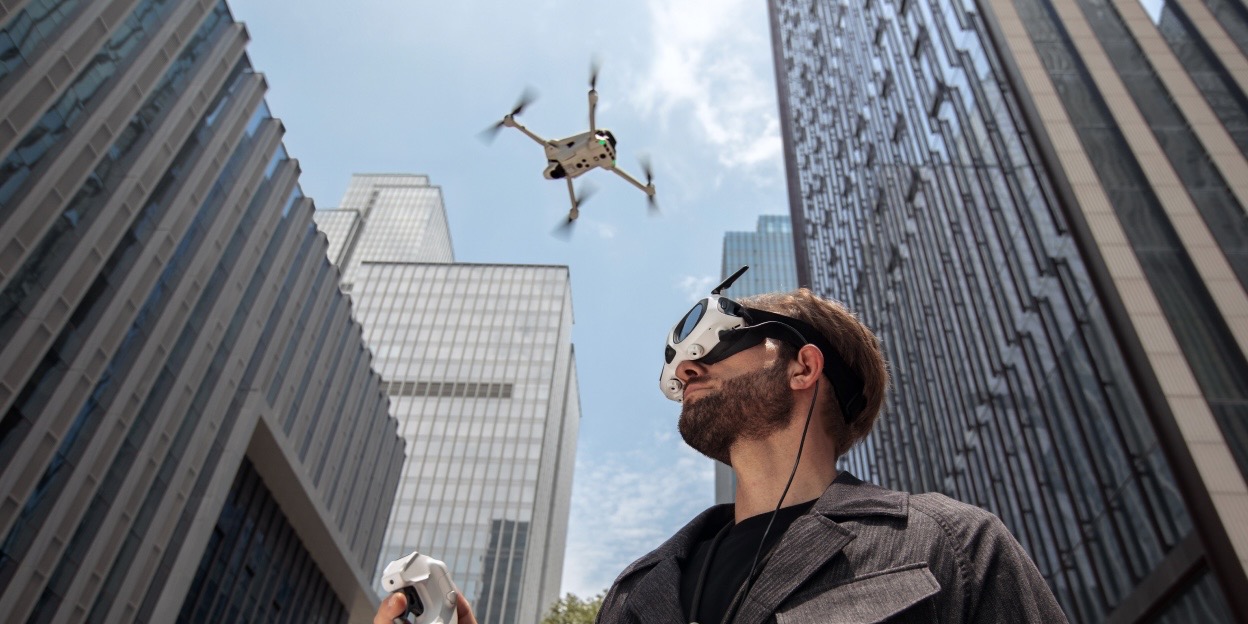
The wait is finally over. After a few months of teases and partial releases, we now have all the details about the new Antigravity A1 drone, including prices, full specs, and features.
What is the Antigravity A1?
In case you’re new, Antigravity is the de facto drone arm of Insta360. While its corporate relationship is unknown, we do know that Insta360 funded the operation to reach this release and has essentially donated its 360 video tech and expertise to the drone.
The A1 is a sub-250 grams drone that instead of featuring a front-facing camera on a gimbal, features two ultra-wide angle cameras on top and below to form a complete 360-degree video of its surroundings. Basically, it’s a flying 360 camera.
A first of its kind, from the industry leader in 360-degree video technology.
A1 specs
As mentioned earlier, the Antigravity A1 is a sub-250 gram drone and is roughly the same size as DJI’s Mini 4 Pro. It sports two 1/1.28-inch sensors and can capture up to 8K/30 fps 360 video, with higher frame rates available at lower resolutions. It has a very similar spec list to Insta360’s X5 camera, and really, you can just say it’s an X5 in a drone.
Similar to the DJI Mini 4, Antigravity has two battery options for the A1: a standard battery that keeps the drone below 250 grams and supports up to 24 minutes of flight time, and a higher capacity but heavier battery that can support up to 39 minutes of flight time.
FPV only
The primary and, for now, only way to fly the A1 drone is in a fully immersive FPV setup. Featuring some of the best drone goggles I’ve personally used and the “Grip” controller, which is similar in nature to DJI’s Motion Controller.
The goggles have two 1-inch Micro-OLED (2560×2560) displays and are powered by a battery hung around your neck. From there, the goggles will track your head movements to allow you to look around the live 360 video feed. This provides a truly awe-inspiring experience that makes it feel like you’re really flying.
So how do you fly? In contrast to DJI’s “Look-and-fly” way of doing things, Antigravity is doing a “Point-and-fly” method. Whatever direction you’re pointing the Grip controller, that is the direction the A1 flies. If you’re used to the DJI Motion controller way of flying, it takes some time to adjust but soon it’s as intuitive as the original Avata was to fly when it released.
All the power from Insta360
On top of funding the drone project, Insta360 donated its camera tech, subject tracking software, and editing suite for a seamless user experience for those familiar with it.
The pro of a 360 drone is the ability to not have to worry about framing and just worry about flying the drone where it has to be. While there are some movements you may not want to do while flying, nothing is going to ruin the shot as everything is in frame. To ensure a completely invisible drone, Antigravity even put in retractable landing gear. This both protects the bottom lens from touching the ground but also keeps the legs tucked out of the way of the camera’s view.
Once you pull the video off the drone, you can use a full suite of easy editing tools provided by Antigravity/Insta360 to reframe and edit your content. Available both for the desktop and mobile, the Antigravity Studio is the place you’ll want to be after each flight.
Antigravity A1 pricing and availability
The Antigravity A1 360 drone starts at $1,599 for the standard bundle, which includes the drone, goggles, a controller, a standard flight battery, a carrying case, and spare propellers.
Two more bundles exist for the A1: the Explorer Bundle for $1,899 and the Infinity Bundle for $1,999. The Explorer Bundle features three extra standard flight batteries, a charging hub, and a sling bag to hold everything in. Meanwhile, the Infinity Bundle swaps those three standard batteries out for the extended flight batteries and adds a quick reader for your MicroSD card.
For now, the Antigravity A1 drone is only available through Antigravity’s website and Best Buy.


FTC: We use income earning auto affiliate links. More.


Comments