
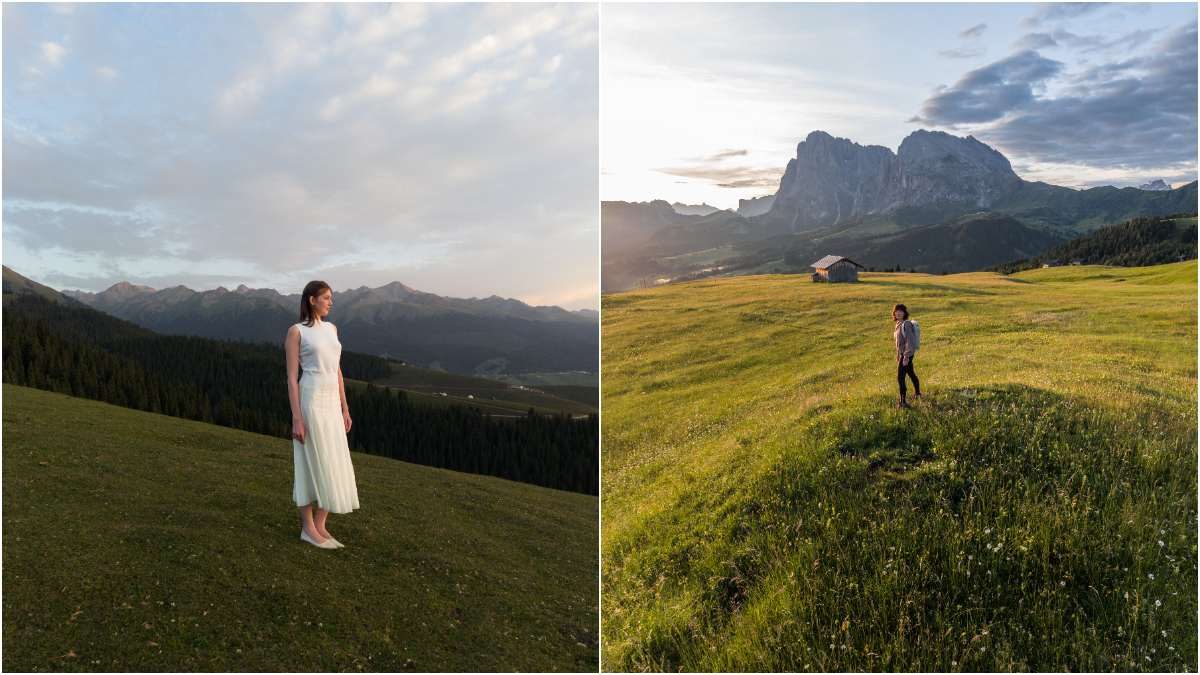
If you’ve ever filmed an incredible drone shot only to crop away half of it for Instagram Reels, TikTok, or YouTube Shorts, you’re not alone. Traditional drone cameras capture wide landscape footage. That’s perfect for YouTube and TVs, but not so much for today’s vertical-first social platforms. Cropping a horizontal video into a 9:16 format often means sacrificing image quality or cutting out parts of your scene. The good news? If you own a relatively recent DJI drone, you may not need to crop at all.
Read on to see exactly which DJI drones support vertical shooting and how to turn it on. Some models can capture true vertical footage by physically rotating the camera, while others intelligently crop the sensor to create portrait videos without requiring extra editing.
Which DJI drones support vertical shooting?
DJI Mini series
- DJI Mini 5 Pro: DJI’s newest sub-249g flagship mini drone with a 1-inch 50MP camera, forward LiDAR, ActiveTrack 360, and True Vertical Shooting, making it ideal for creators who want premium image quality in a compact package. Right now, you can grab its Fly More Combo with DJI RC 2 screen remote controller for only $989 after a 10% discount.
- DJI Mini 4 Pro: One of DJI’s most popular lightweight drones, featuring omnidirectional obstacle sensing, ActiveTrack 360, 4K HDR video, and a rotating camera for true vertical shooting.
- DJI Mini 3 Pro: A favorite among travel creators thanks to its rotating gimbal, obstacle sensing, and professional imaging features.
- DJI Mini 3: An affordable sub-249g drone that still supports true vertical shooting for both photos and videos. Its Fly More Combo with DJI RC screen remote controller is presently available at 10% off for $649.
DJI Mavic series
- DJI Mavic 4 Pro: DJI’s flagship camera drone with a triple-camera system, up to 6K recording, a 360-degree Infinity Gimbal, and professional imaging capabilities. It also supports portrait shooting through its rotating camera system.
DJI Neo series
- DJI Neo 2: A beginner-friendly selfie drone offering 4K recording, AI subject tracking, gesture controls, and quick vertical video creation.
- DJI Neo: DJI’s controller-free palm-sized drone that makes aerial selfies and social content easy with automatic flight modes and voice or app controls. You can grab its three-battery combo for only $245 right now after a 15% discount.
DJI Flip
DJI’s creator-focused beginner drone combines built-in propeller guards, AI tracking, 4K video, and simple one-button flight modes. Designed for new pilots who primarily create social media content, its Fly More Combo with RC 2 screen remote controller can be picked up for $619 after a 21% discount.
DJI Air series
- DJI Air 3S: A dual-camera drone with improved low-light performance, advanced obstacle sensing, and excellent image quality for enthusiasts.
- DJI Air 3: Another dual-camera favorite that balances portability with longer flight times and versatile focal lengths.
Not every DJI drone does it the same way
One important detail is that “vertical shooting” doesn’t mean the same thing across DJI’s lineup. Some drones physically rotate the camera 90 degrees, while others create a vertical image by cropping the sensor.
Drones with true vertical shooting
These drones physically rotate the camera into portrait orientation include the DJI Mini 5 Pro, Mini 4 Pro, Mini 3 Pro, Mini 3, and DJI Mavic 4 Pro.
Because the sensor rotates, you get maximum image quality and resolution without cropping. That’s especially useful if you’re producing professional social media content or want the cleanest possible vertical footage.
Drones that use intelligent cropping
These models don’t rotate the camera. Instead, DJI crops the recorded image to create a vertical frame: DJI Neo 2, DJI Neo, Flip, Air 3S, and Air 3.
The result is still ready for Instagram Reels, TikTok, Facebook Reels, or YouTube Shorts, but the gimbal itself never turns 90 degrees.
New: This update could change how you use your DJI drone data
How to shoot vertical videos on your DJI drone
For most supported drones, enabling portrait mode takes only a few taps. Open the DJI Fly app and connect your drone. Enter the camera view by tapping Go Fly.
If you’re using a Mini, Air, Neo, Flip, or Mavic model that supports portrait mode, tap the Landscape/Portrait icon on the right side of the screen.
That’s it. You’ll now be recording in a vertical format instead of the standard landscape view.
Some models also offer shortcuts.
If you’re flying with the new DJI RC Pro 2, simply rotating the controller’s screen automatically switches between landscape and portrait shooting on compatible drones like the Mini 5 Pro and Mavic 4 Pro.
You can also assign the controller’s C2 button to toggle portrait mode, making it easy to switch orientations while flying.
A few limitations to keep in mind
Not every shooting mode supports portrait recording.
For example, DJI says the Air 3 and Air 3S only support vertical shooting while recording standard video, but not photos or slow-motion clips. Likewise, Neo, Flip, and Air-series drones must be switched into portrait mode before you begin recording, since you can’t change orientation mid-flight.
DJI also recommends keeping both your drone firmware and the DJI Fly app updated to ensure all portrait shooting features are available.
What if your DJI drone doesn’t support vertical shooting?
You’re not completely out of luck.
DJI recommends enabling the 9:16 Frame Guide inside the Camera settings. This overlays a vertical guide on your screen so you can compose your shot with social media in mind, then crop the footage later during editing. It’s not quite as convenient as native portrait recording, but it’s an easy workaround for older drones.
As short-form video continues to dominate social media, it’s clear DJI is treating vertical shooting as more than a niche feature. Whether you’re capturing travel clips for Instagram, cinematic landscapes for Shorts, or behind-the-scenes content for TikTok, newer DJI drones increasingly let you shoot in the right format from the start, saving time in editing and preserving more of your footage.


FTC: We use income earning auto affiliate links. More.

Comments