
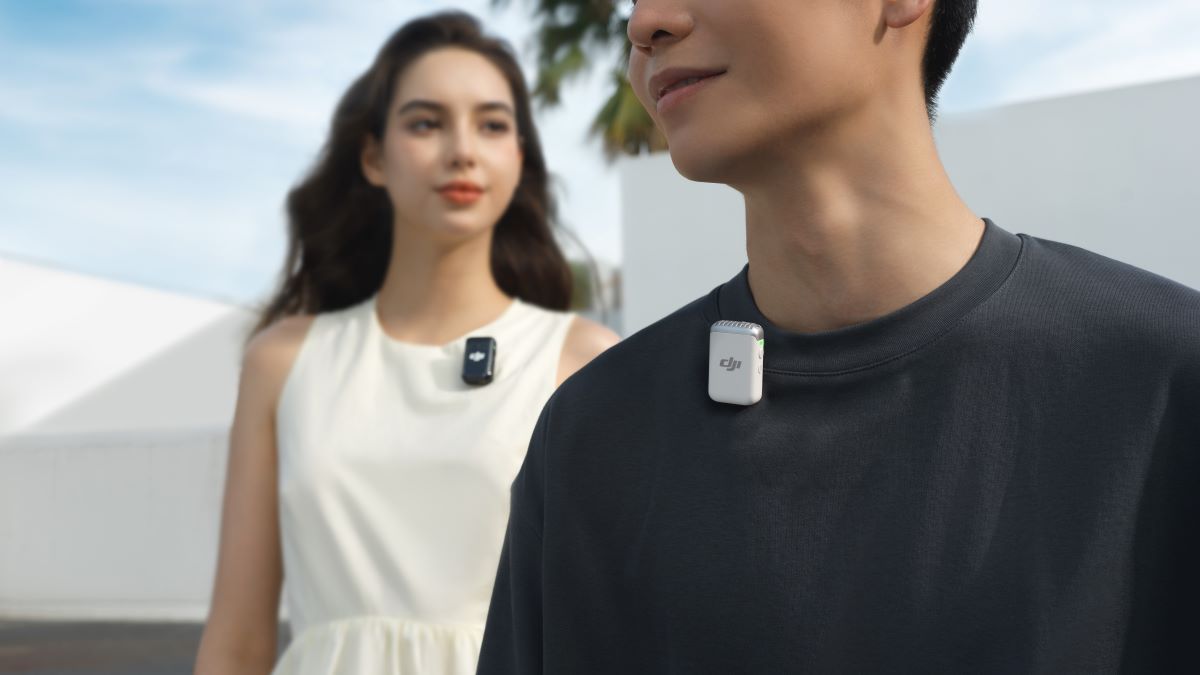
It shouldn’t come as a shock to you that DJI is more than just a drone company. They have released some of the most used tools for creatives, from gimbals and cameras to even portable power banks. One of its top products outside of drones, the DJI Mic, has two versions: the Mic Mini and Mic 2. Which is the best option for you to purchase?
The DJI Mic 2 and Mic Mini both do the same job: capture audio. They just do it in two different sizes, with a few different features between the two.
DJI Mic 2 and Mic Mini similarities
On the go design
Both the DJI Mic 2 and Mic Mini are designed for on-the-go and quick-access use. Everything you need—transmitters, receiver, and windscreens—can be stored inside their charging case. The case can be used to keep both the transmitters and receiver charged throughout your day of shooting.
Both the Mic 2 and Mic Mini can be quickly turned on by just removing them from the charging case. Once they’re out, they can be clipped onto whatever you’re recording, and they’re good to go. While their weight differs, the Mic 2 at 28g and the Mini at just 10g, they’re lightweight enough to barely notice they’re there.
Multiple device compatibility through receiver
With the use of the DJI Mic receiver, both the Mic 2 and Mic Mini can be used with a wide range of devices. These include smartphones (both with the receiver and directly through Bluetooth), cameras, and computers. Basically, the DJI Mic receiver can connect to anything with a USB-C plug; that includes a soundboard if you use a USB-C to XLR converter.
Although if you’re using something like a RODE Podcaster, I suggest using RODE’s Wireless GO mics, as they can be connected directly to the board using Bluetooth.
While both mics come with a dedicated receiver, when buying them as a set, the receivers are different. The Mic Mini’s receiver does not feature a screen, just a dial for sensitivity control. Meanwhile, the DJI Mic 2’s receiver has a 1.1-inch screen that allows you to completely control the settings of the mics without the need for the DJI Mimo app.
OsmoAudio support
Fitting with the multiple device compatibility theme, DJI’s new OsmoAudio system is basically just a term to describe DJI products that can be directly connected to the DJI Mic 2 and Mini for audio. These include: Osmo Action 5 Pro, Osmo Action 4, and the Osmo Pocket 3. OsmoAudio is only available on the Mic 2 and Mini, not on the original DJI Mic.
Wind screens (dead cats)
Both the Mic 2 and Mic Mini support the addition of wind screens or “dead cats” to help cut down any wind noise while recording outside. One difference will be the colors of the included screens in the box. With the Mic 2, you’ll only get the grey screen to attach to your transmitter. However, with the Mic Mini, you’ll get both the grey plus a matching black or white screen.
Magnets!
Back by popular demand, both the Mic 2 and Mic Mini transmitters come with multiple ways to mount them to your subject or object you are recording. Both will have a clip that is perfect for clothing or backpack straps, but the clip is also magnetic. This allows you to either stick it to another magnetic surface for hands-free audio recording or use the included magnet to attach the mics to thicker articles of clothing or to place lower down on a t-shirt.
Who doesn’t love magnets?
DJI Mic 2 and Mic Mini differences
Now on to the differences. Honestly, there’s not a lot, and they are mostly tailored towards their intended users of each product, as the Mic 2 is more meant for more serious videographers, while the Mini is for content creators.
Internal recording
One reason why the Mic Mini is able to be so much smaller than the Mic 2 is the removal of internal recording. This means that there are no internal backup recordings with the Mic Mini like there are with the Mic 2; everything will be recorded on the receiver or the camera itself.
Alongside this removal, the Mic Mini transmitters do not feature a USB-C port. This means if you purchase the transmitter by itself, you will require a special dock to charge it.
The Mic 2’s internal recording also features 32-bit recording. This allows for more flexibility with post-processing the audio for those who want or need that feature.
Lavalier mic support
Another feature of the Mic 2 is the support for plugging a lavalier mic into its transmitter for more discreet options when recording on a professional set. While the design of the DJI mics is sleek, sometimes having the DJI logo in frame isn’t appropriate, and you might need a more professional-looking lav mic.
This also works with boom mics like the RODE VideoMicro if you need to place one remotely.
Battery life
The DJI Mic Mini comes with a much larger battery life, 48 hours, when including the charging case capacity. The Mic 2’s total battery life is 18 hours; however, it also has much more powerful features compared to the Mini. Either way, 18 total hours should still get you through an entire day without needing a recharge. However, the Mini might be better for long trips where charging might be more scarce.
Auto audio limiting
One feature only found on the DJI Mic Minis is an audio limiter while recording. This feature will automatically lower the audio if it detects a loud noise that might cause your recording to clip.
What is on both the Mic 2 and Mini is noise cancellation to give you clearer recordings without the extra work. Both also feature the ability to record a “safety track,” where the left channel records at your designated level and the right channel records 6dB lower. The safety track is also designed to save your recordings from any potential clipping during unexpected louder noises.
Price
The key difference between the DJI Mic 2 and Mic Mini is the price. The Mic 2 comes in at $349, while the Mic Mini comes in at $169. You can actually get that cheaper if all you need is the transmitter and not a receiver (only recording to Osmo cameras or your phone). The DJI Mic Mini transmitter by itself is only $59, and the DJI Mic 2 transmitter only is $99.
There are also transmitter + receiver combos you can buy for the Mic 2 and Mic Mini, those being $219 and $89 respectively.
Which mic should you buy?
It truly depends on your use case for the mic. If you need those more professional features like lav mic capability or 32-bit audio recording, then the Mic 2 should be your choice.
However, if you’re just looking for a discrete, high-quality mic that is easy to use, the Mic Mini will likely do the trick for most use cases.


FTC: We use income earning auto affiliate links. More.


Comments