
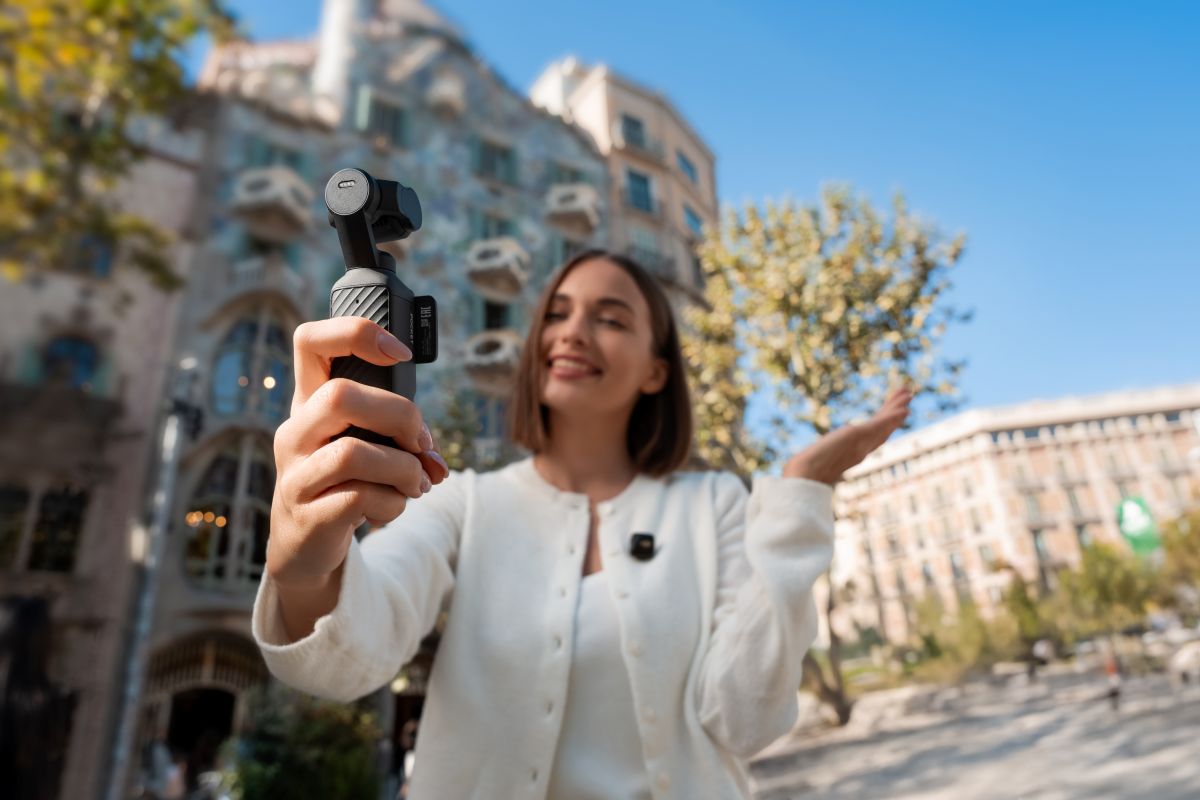
The DJI Osmo Pocket 4 has only recently started appearing through third-party sellers for US buyers, but DJI is already trying to prevent new owners from making expensive mistakes.
While most coverage of the Pocket 4 has focused on its upgraded camera, larger storage capacity, and creator-focused features, DJI has quietly published a detailed set of user tips, compatibility notes, and usage warnings that reveal something equally interesting: this tiny camera is far more sophisticated than it looks.
In fact, some of the company’s recommendations sound more like advice for protecting a professional filmmaking tool than a gadget small enough to fit in your pocket.
For American creators finally getting access to the new Pocket 4 through importers and third-party retailers, these details may be just as important as the camera’s headline specifications.
Pocket 4 is built for creators who hate carrying gear
The Osmo Pocket series has always occupied a unique place in the camera market. It isn’t an action camera like a GoPro. It isn’t a smartphone. And it isn’t a bulky mirrorless setup requiring a separate gimbal. Instead, DJI’s formula has been simple: take a stabilized camera, shrink it into a pocket-sized body, and make it fast enough that creators actually want to carry it everywhere.
Pocket 4 continues that philosophy. The camera combines a three-axis mechanical gimbal, upgraded imaging capabilities, internal storage, wireless connectivity, and extensive accessory support into a device that can disappear into a jacket pocket.
But DJI’s latest support materials reveal that getting the most out of the camera requires understanding a few quirks.
New: DJI Pocket 4 rival? Insta360 unveils Leica-powered Luna Ultra camera
The first mistake? Laying it down while it’s powered on
Most people wouldn’t think twice about placing a camera on a table. DJI says Pocket 4 owners should.
According to the company, placing the camera flat while powered on can trigger Gimbal Protection mode because the gimbal system is actively working and stabilizing in real time. When the camera is running, the gimbal expects freedom of movement. Letting it rest against a hard surface can interfere with that operation and cause the protection system to activate.
It’s a small detail, but one that highlights how different Pocket 4 is from a conventional camera or smartphone.
Another warning: Don’t carry it by the lanyard hole
This may sound obvious, but DJI felt the need to specifically address it. The company says users should never carry or hang the camera using the gimbal clamp’s lanyard hole.
The lanyard attachment is designed only as an anti-loss feature, not a weight-bearing handle.
Repeatedly lifting the device by the lanyard could damage the gimbal assembly or potentially cause the camera to fall. Considering the Pocket 4’s mechanical stabilization system is one of its biggest selling points, protecting that hardware should be a priority.
DJI’s biggest design change isn’t the camera
One of the more interesting revelations involves something surprisingly simple: the protective clamp.
Previous Pocket models relied on larger protective covers, but DJI has redesigned the Pocket 4’s protection system around a dedicated gimbal clamp. The company says the new design secures both the gimbal and rotating screen while keeping the camera compact and easier to access.
The change might seem minor until you realize how many Pocket users remove and reinstall their protective covers multiple times every day. Less friction means more shooting. And that may be the real reason DJI made the switch.
Pocket 3 owners get some good news
One of the biggest questions surrounding Pocket 4 has been accessory compatibility. DJI’s newly released compatibility guide confirms that many popular Pocket 3 accessories still work with the newer camera. Compatible accessories include:
- Magnetic ND filters
- Black Mist filters
- Wide-angle lenses
- Mini tripods
- Threaded handles
- Expansion adapters
For creators who already invested in Pocket 3 accessories, that’s welcome news. However, compatibility isn’t universal. Pocket 3 protective covers don’t fit Pocket 4, while the new Pocket 4 fill light and gimbal clamp are not compatible with older models.
The battery story is better than most people realize
Battery life has become one of Pocket 4’s most underrated features. DJI says the camera can record continuously for up to 240 minutes when shooting at 1080p/24fps. That’s already impressive for a device this small. But the optional Battery Handle changes the equation.
According to DJI, attaching the Battery Handle can add up to 150 minutes of additional recording time. In practical terms, that means creators could potentially achieve nearly 390 minutes of total recording time under DJI’s test conditions.
For travel creators, event videographers, journalists, and vloggers, that kind of endurance can make the difference between carrying one battery and carrying several.
Even more interesting is DJI’s confirmation that the Pocket 3 Battery Handle can charge the Pocket 4. Keep in mind, though, that compatibility is limited because the two generations use different USB standards, but the cross-generation support is a nice bonus for existing owners.
The fastest way to move footage
One frustration shared by nearly every creator is file transfers. DJI appears determined to make that process faster.
Users can still transfer footage wirelessly through the DJI Mimo app, but DJI says the fastest method is a wired USB-C connection using a USB 3.1 compatible cable. The company specifically highlights USB Drive mode, which allows Pocket 4 to function like external storage.
For creators regularly moving large 4K video files, those faster transfer speeds could save significant time over the course of a year.
Internal storage solves another common problem
DJI is also pushing users toward internal storage. Pocket 4 saves footage internally by default, allowing creators to start shooting immediately without first installing a memory card.
However, DJI notes that users should decide where footage will be stored before shooting because files cannot be transferred between internal storage and microSD cards from within the camera itself. It’s a small workflow detail, but one that could prevent headaches later.
Not every SD card is good enough
DJI also uses its support guide to deliver a warning that many creators learn the hard way. Not all memory cards are suitable for modern high-bitrate video recording. The company recommends U3 and V30 rated microSD cards or better to ensure reliable recording performance.
Cheaper cards may work initially but can create dropped frames, recording failures, or file corruption when capturing demanding footage. For a camera positioned as a professional creator tool, DJI clearly wants users to avoid that risk.
The real story behind Pocket 4 isn’t just better image quality or longer battery life. It’s that DJI has spent years refining a product category that barely existed before the original Osmo Pocket arrived.
The company isn’t simply selling another camera. It’s selling convenience. Everything from the redesigned gimbal clamp and extensive accessory compatibility to nearly six-and-a-half hours of potential runtime and high-speed file transfers points toward the same goal: removing barriers between creators and content.
And now that Pocket 4 is finally becoming available to American buyers through third-party channels, DJI’s message is clear. The camera may fit in your pocket. But it was designed to replace far more gear than its size suggests.
More: DJI critics won’t like what this drone security audit found


FTC: We use income earning auto affiliate links. More.


Comments